Financial services
Loan, account and advisory agreements
Get loan, account and advisory documents signed quickly, with a clear record of who signed and when.
E-signature for high-volume teams
Personal Auto Insurance Application
I confirm that the information in this application is true and complete to the best of my knowledge.
Signing Session ID 8e41c2d7-3b9f-4a65-b1d0-6f27e9a45c13 | Signed at 09/22/2026 04:34 PM UTC | IP 198.51.100.73
Bundle every document and signer for a transaction into one package, sent by email, text or both. Customers sign on any device with no account or app. You get back one PDF with the audit report, digitally signed so Adobe Acrobat shows a green check.
3,278,069
packages signed and counting
§ 1 In brief
Every unsigned package holds up a sale, a policy or a hire. EasyInk shortens the wait and leaves a record your auditors can check.
(a) Faster time to revenue
Links arrive by email, text or both. Signers need no account or app, are guided field by field, and cannot finish with a required field left blank.
(b) Control and visibility
Staff see which packages need attention, which are in progress and who created each one. Your organization can switch off voiding and copying, so staff cannot cancel or clone a package against policy.
(c) Audit readiness
Each completed package carries an audit report with names, UTC times and IP addresses, and a digital signature from a DigiCert-issued certificate. Adobe Acrobat flags edits made to the signed file.
§ 2 How it works
Staff build, send and track every package from one web app.
Upload PDFs or Word files, add signers, choose email, text or both, and drop fields on the page. Apply a saved field template, or load a spreadsheet for bulk send.
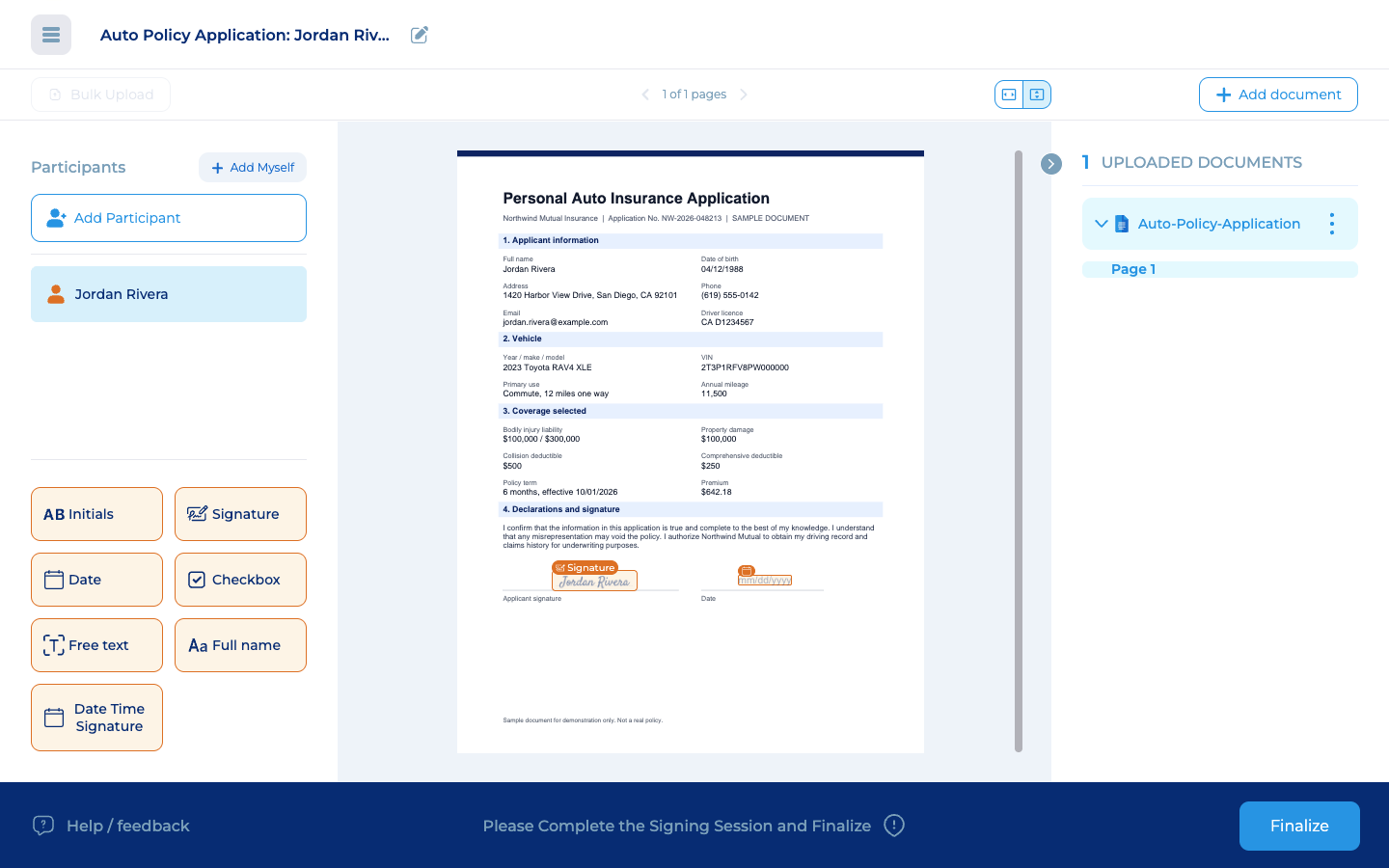
The signer accepts your terms, then moves field by field with a live count of required fields. They type or draw a signature, in English or Spanish.
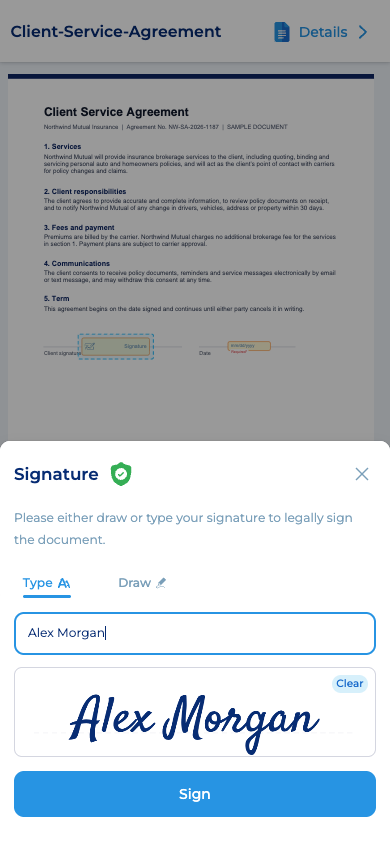
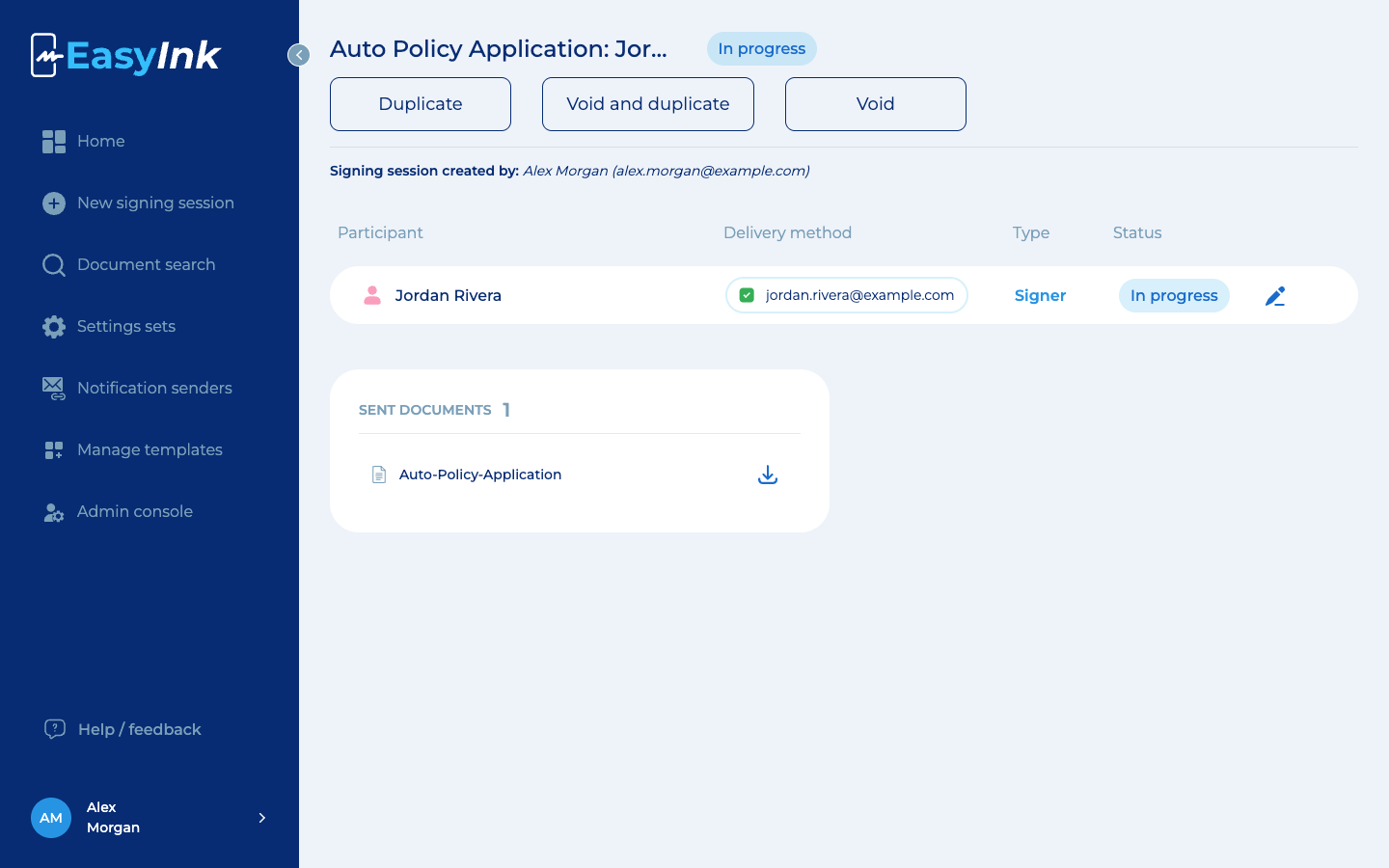
Track each package's status. Fix a wrong contact before the link is opened, or void and recreate in one step. Download one sealed PDF with the audit report.
§ 3 Certificate of completion
When everyone has signed, EasyInk adds a certificate of completion to the end of the PDF. The file is also digitally signed with a certificate issued by DigiCert, which is on the Adobe Approved Trust List. Adobe Acrobat and the free Acrobat Reader show a green check when the signature is valid and the file is unchanged.
Certificate of completion
Audit Report
History (a)
Agreement completed
09/22/2026 04:34 PM UTC
Package details (created, created by, subject, session ID, file names, page count), then every step: created, viewed, e-signed, completed. Each step shows the person, email, time in UTC and IP address.
EasyInk provides the signing certificate through its platform, so there is nothing to buy or set up. DigiCert is on the Adobe Approved Trust List, so Acrobat trusts the signature automatically.
If someone edits the signed PDF, Acrobat shows a warning instead of the green check. A printed copy carries no signature at all, so share the original download.
The signed documents and the certificate of completion come as one PDF. Anyone can check it in Acrobat Reader without an EasyInk account.
§ 4 Capabilities
These go past the standard checklist. They are built for teams that send thousands of packages and expect any file to be reviewed later.
Run all your organizations from one admin console: add users to each organization and share settings, terms and notification templates across them, or keep them separate.
Each organization gets the settings it needs without a separate setup.
One admin console
Ready-made ACORD forms are coming soon. Until then, upload the forms you already use, place fields once and save the layout as a template your team reuses.
Insurance teams will send the industry’s standard forms without rebuilding them.
Forms
A Date Time Signature field stamps a UTC time the signer cannot edit. An optional footer on every page shows the session ID and first signer's signed-at time and IP address.
With the footer on, one loose page shows its package, signing time and IP.
PDFs that already carry digital signatures, such as carrier forms, join the package as read-only attachments. Their signatures and metadata are not broken. Signers can view them, and the attachments download separately.
Partner documents keep their original signatures inside your package.
Pre-signed PDFs: existing signatures and metadata preserved.
Send each signer's link by email, text message or both. Texts to numbers that have opted out are rejected automatically.
Reach customers on the channel they answer, with opt-outs enforced.
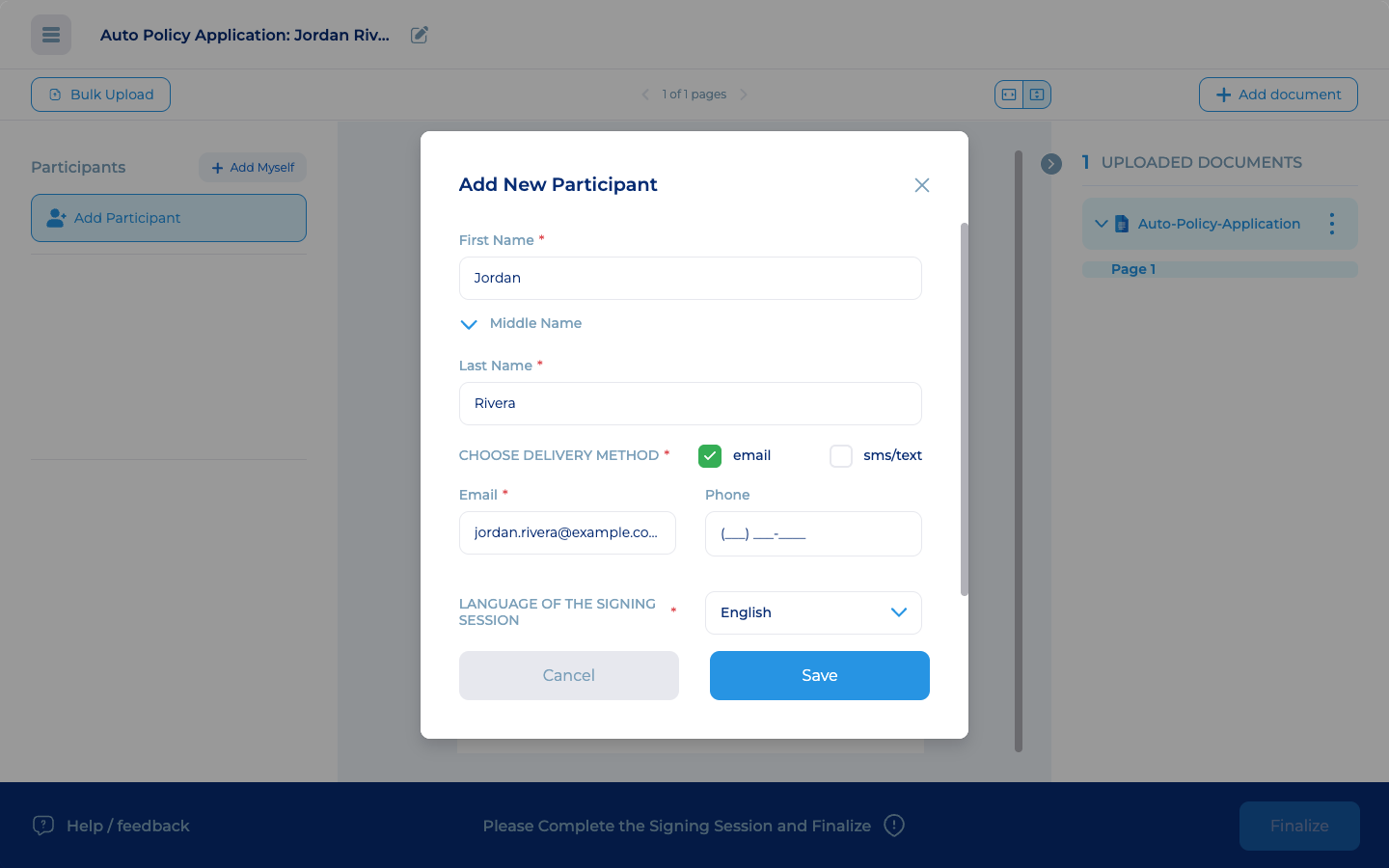
Update a pending signer's email, phone or delivery method, and a new link replaces the old one. Or void and recreate a corrected draft in one step, and everyone signs again.
Staff correct a wrong email or phone in place, so packages keep moving.
jordan.rivra@example.com
jordan.rivera@example.com
Correcting a pending signer, fictional example
Brand settings control the logo, signer and sender terms, signer instructions, decline notice, email and text wording, link expiry and date format. One company can run several brands or agencies.
Every agency or brand presents its own legal text and look.
Configured per brand
§ 5 Essentials
The capabilities buyers compare across e-signature platforms. Check them against your shortlist.
Multi-document packages. Bundle PDFs or Word files (converted to PDF), signers and fields in one package.
Set signing order. Invite everyone at once, or one by one, such as employee, manager, HR.
Drag-and-drop fields. Signature, initials, date, checkbox, free text and full name, each required or optional.
Sign on any device. No account or app. Type or draw a signature on phone, tablet or desktop.
Decline to sign. Signers can decline after a confirmation step and see a notice you write.
Reusable templates. Save field layouts, apply them to each upload, and limit which teams see them.
Bulk send. Load recipients from a spreadsheet. Each person gets their own package to sign.
Live status and expiry. Filter by status. Admins set the signing deadline in days and hours, and unsigned requests expire automatically.
Certificate of completion. An audit report lists each view and signature with UTC time and IP address.
Roles and single sign-on. Roles control who manages users, settings and templates. Single sign-on works with any identity provider.
Search and signed copies. Find past packages on desktop or phone. Signers download their copies when they finish.
API for your own systems. Create, send, track and download packages from your systems. IT tests in staging first.
§ 6 Security
EasyInk runs on a hardened platform built for regulated industries.
| Control | Specification |
|---|---|
| Encrypted in transit and at rest | Every connection uses HTTPS with TLS, and stored data is encrypted with AES-256. |
| Hosted on Microsoft Azure | Enterprise cloud infrastructure, with Cloudflare in front for DDoS protection. |
| Built to PII data management and HIPAA standards | Designed for personal information and protected health information. |
| Role-based permissions | Administrators build roles from specific permissions, such as managing users, templates and settings. |
| Signing links you control | Each signer gets a unique link. Voiding a package stops every open link at once, and unfinished packages expire. |
| Tamper-evident PDF | The complete package PDF, with every signed document and its audit report, is digitally sealed with a DigiCert-issued certificate that EasyInk provides, so Acrobat flags any later change. |
We are happy to complete your security questionnaire as part of the evaluation.
§ 7 Industries
Financial services
Get loan, account and advisory documents signed quickly, with a clear record of who signed and when.
Insurance
Send applications, policy forms and premium finance agreements for signature. Pre-signed carrier forms stay intact, and ready-made ACORD forms are coming soon.
HR and staffing
Bulk send loads recipients from a spreadsheet and gives every employee their own package. Sequential order routes employee, then manager, then HR.
Healthcare
Built to PII data management and HIPAA standards. Patients sign on their phone in English or Spanish, and the audit report records each view and signature with a UTC time.
§ 8 Questions
A.It covers the core: packages, signing order, templates, bulk send, an audit report, roles, single sign-on and an API. Then it adds operational detail: a signature field stamped with UTC time, an optional footer with the session ID and first signer's IP on each page, pre-signed forms kept intact, ACORD forms coming soon, one admin console for every organization, text delivery that enforces opt-outs, and signer wording set per brand.
A.That the PDF's digital signature is valid, that its certificate was issued by DigiCert (on Adobe's trust list), and that the file has not changed since signing. To check, open the all-in-one PDF (Download All) on a computer. It does not confirm a signer's identity. The audit report records each signer's name, contact details, UTC time and IP address.
A.No. EasyInk provides the DigiCert-issued signing certificate through its platform, so completed packages are signed with no certificate to buy or configure on your side.
A.Yes. One option is our REST API: 34 documented operations create packages, add signers and fields, start, track, void and download signed PDFs. Access uses OAuth 2.0 with PKCE, granted by an authorized user, with separate staging and production environments. We have many other ways to connect EasyInk to your systems, and we will pick the right one with you.
A.Yes. EasyInk is built for high-volume operations. Millions of packages are being signed on EasyInk every year.
A.Data is encrypted in transit with TLS and at rest with AES-256, on Microsoft Azure. The platform is built to PII data management and HIPAA standards. Staff sign in through single sign-on with any identity provider, under custom roles, voiding a package closes every open link, and completed PDFs are tamper-evident.
A.You can start using EasyInk today!
A.Pricing depends on your volume and the number of people on your team. Book a demo and we will put together a quote for your business.
§ 9 Book a demo
Bring a blank copy of a form you send every day. We will build the package live, send it to your phone, and walk you through the signed PDF and its audit report.
Demo request received
We will be in touch within one business day to set up your EasyInk demo.